Hey All!
Well I thought I might try a new segment in the blog!
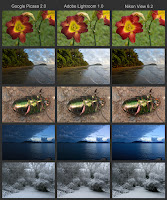
Specifically I decided to do some tests on the photos that I have taken, and have found out that they are not as good as they should be.
Que? I hear you cry. Ok, let me go back a step or two...
When I take a picture on my camera, it creates a digital photo in a format known as RAW. You just need to know that this is the purest form it can be.
Unfortunately, Nikon (who make my camera) don't share their RAW secrets with anyone else. So, other companies such as Google and Adobe have to guess. It is a very good guess, but a guess nonetheless.
But here is the real crux. The software that
Nikon supplies is great for looking at an image, but absolute rubbish at everything else.
Seeking an easy life, I naively decided at some point in the past to just use the
Google Picasa so that I could do all my photo management in one place.
Then came along
Adobe Lightroom, and I suddenly found myself um-ing and ah-ing over the various packages. Hence tests began.
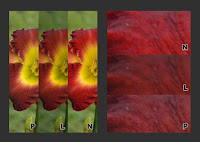
I was frankly quite shocked to see the differences in quality. Specifically the picasa photos all look very bland, and lack a significant amount of colour detail. This is not so noticeable on the scenic shots, but really significant on the close ups, especially ones with bright colours.
Adobe lightroom is generally better than Picasa, but still not a patch on Nikon View.
So what is the answer?
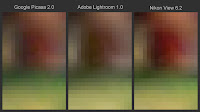
Well, I am going to give up the easy life and try a two pronged approach: first of all, open the images in Nikon View and export as high quality jpegs; secondly, use Google Picasa as I have done in the past to manage my thousands of images. It makes the process quite a bit longer, but the results will be worth it. In order to retrospectively apply this process to all my photos, well I think it will take a few days. Once that is done I will upload a few of the special ones!
Whilst talking about Google Picasa, for those of you who do not already use it, use it! It is a truly brilliant program that is just ever so easy to use, very quick, and it has so many useful tricks up it's virtual sleeves! (straighten image, crop image, feel lucky image adjust, web upload, email, blog, etc... and most of these are just one click!) Plus, it is free!
Well that is it for my tech update... oh and to let you all know that the new links on the web page are nearly ready... nearly!
Oly
P.S. I do realise that this blog entry was not of the greatest interest to a lot of you. However, this project is something that I am having to spend a lot of time on, hence why I am sharing :)


 I haven't' got much to report today as we spent a lot of time in an internet cafe getting software updates and uploading pictures etc.